



Supports a wide range of scan needs with state-of-art feeding technology
The scanner comes with reliable paper feeding, facilitating a seamless workflow. Scan faster without interruptions to help boost organizational efficiency.
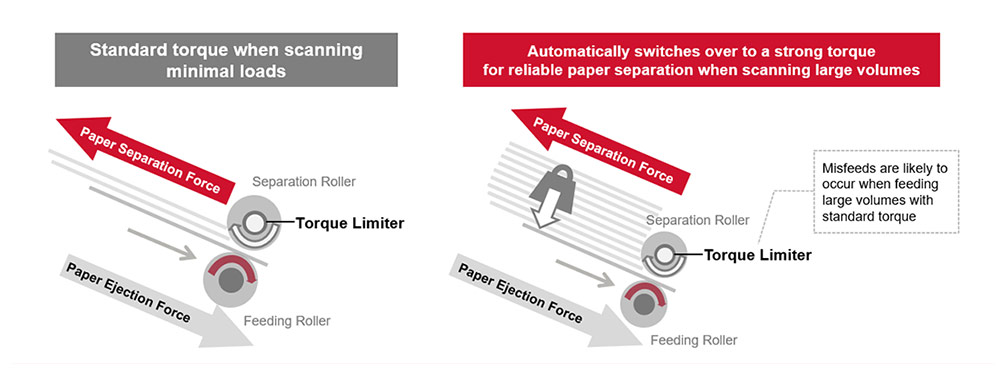
Scans large volumes with “Automatic Separation Control”
The "Automatic Separation Control" optimizes paper feed to match the number of sheets loaded, and allows stable paper feeding even when performing large volume scans. Interruptions arising from paper misfeeds at high speed scans of 70 ppm, can be avoided.
Evolved paper protection function combines sound and image technologies
In addition to iSOP* Technology that halts scanning heavily-skewed and stapled documents at abnormal noise detection, the "Image Monitoring" technology acts as a paper protection.
A technology that performs real-time image monitoring to keep document safe when angles exceed the safe range to assist users with accurate and comfortable scanning.
*Intelligent Sonic Paper Protection.
Supports scanning of wide range of documents
The scanner handles various types of documents to enable all scans with a single scanner. The Manual Feed Mode enables reading of copy forms, glued-on documents and bi-folded A3 documents. Passports and booklets up to thicknesses of 7 mm can be read as well, without carrier sheets.
Since the scanner identifies the presence of thick plastic cards and labelled or barcoded documents, it excludes multi-feed errors, making simultaneous scanning of cards and paper document possible even when multi-feed detection is ON. Users are able to set documents together and continue scanning without interruption.
Optimized high-quality image data for business use
PFU Clear Image Capture
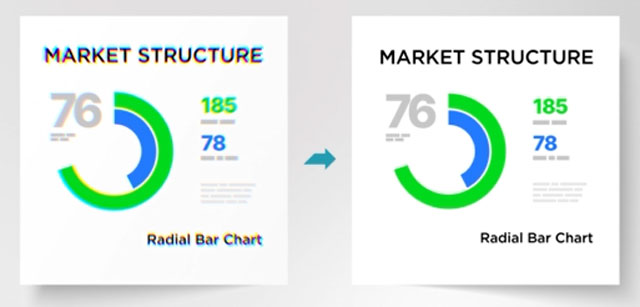
Combining the new CIS sensor with the GI image processing engine suppresses the occurrence of color shifts.
"PFU Clear Image Capture" produces high definition images for data extraction while keeping power consumption to the minimum and reduces startup times.
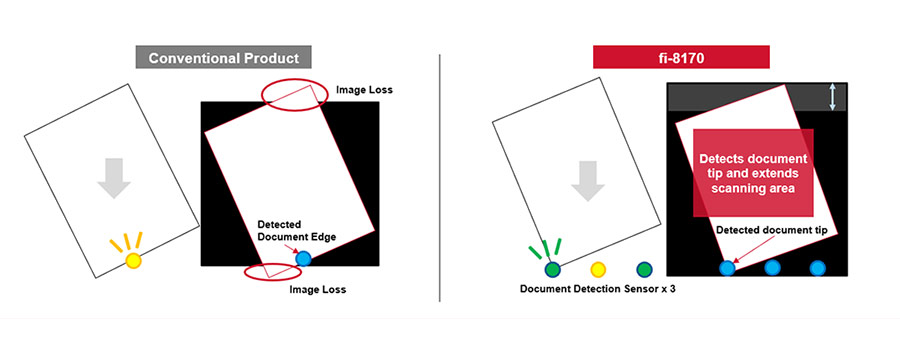
Avoid image loss with Overscan Control function
Three sensors accurately detect tips of documents and extend scanning area automatically, ensuring that sufficient margins are secured around the scanned documents. An accurate image data can be generated without defects even when original documents are skewed. Users can save the time to re-scan documents.
Increased usability and flexibility to scan in any environment
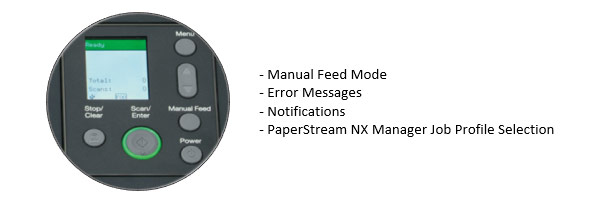
Stress-free operation with the Color LCD display
Equipped with a color LCD panel, users can view status information and select setting configuration more easily. Use of color enables intuitive operation, for reduced human errors.
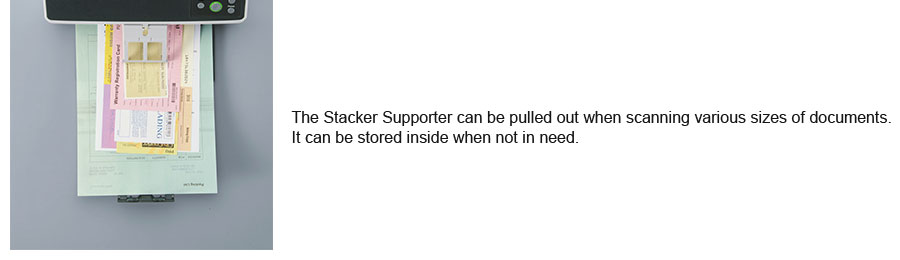
Keep documents in order with the Stacker Supporter
The Stacker Supporter keeps documents in order, even when scanning mixed batches containing small pieces of paper that tend to fly out of the document tray. Scanned documents are easy to retrieve, reducing time spent on post-scan organization.
Supports various operation modes according to the customer’s environment
The scanner supports both USB and LAN connectivity so that it can be used not only near the computer but also in various places under the network environment.
By using server software "PaperStream NX Manager"*1, it is possible to scan in environments without the PC or even from a Web application running on a thin client terminal.
*1 A Windows Client Access License (CAL) is required for each scanner device or user.
Advanced software improves workflow before and after scanning
The functions of PaperStream IP and PaperStream Capture, scanner driver and capture software for fi Series respectively, improves operators’ overall productivity, by reducing the number of operations before and after scanning.
PaperStream Series software is easier to use with expanded functions
With "Setting Assistant" on PaperStream Capture, frequent manual operations like deleting blank pages or correcting page orientations, can be reduced by following the suggestions that pop up in the software notifications.
Options are available for added flexibility.
- For the customers requiring advanced workflow, PaperStream Capture Pro, at a fee.
- For customers with simple and basic operation needs, PaperStream ClickScan.
General Info: | |
Product Type: | Scanner. |
Brand: | RICOH. |
Model Device: | RICHO fi 8170. |
Model Number: | PA03810-B051. |
Tech Spec: | |
Scanner Type: | ADF (Automatic Document Feeder) / Manual Feed, Duplex. |
Scanning Speed Smplix: | 70ppm (200/300 dpi). |
Scanning Speed Duplex: | 140ipm (200/300 dpi). |
Image Sensor Type: | CIS x 2 (front x 1, back x 1). |
Light Source: | RGB LED x 2 (front x 1, back x 1). |
Optical Resolution: | 600x600 dpi. |
ADF Capacity: | 100 sheets (A4 80 g/m² or Letter 20 lb). |
Expected Daily Volume: | 10,000 sheets. |
Interface: | USB 3.2 Gen1x1 / USB 2.0 / USB 1.1, Ethernet 10BASE-T, 100BASE-TX, 1000BASE-T. |
Power Requirements: | AC 100V - 240V 50/60 Hz. |
Reviews
Average
5.0